
An ultrawide monitor and a pair of standard monitors both give you more room to work, but they are not the same amount of room, and they do not behave the same way. The right choice depends on what you keep on screen, what your computer can connect to, and how much desk you have.
This guide compares the two setups with numbers you can check: screen width, height, and pixel count for the most common sizes. It then covers window layouts, cables, and the cases where each setup is the wrong choice.
The Short Answer
- Choose an ultrawide if you work in one wide document at a time, such as a video timeline, a large spreadsheet, or two documents side by side, and you want one cable and no gap in the middle.
- Choose dual monitors if you keep separate apps open full screen, share your screen in meetings often, or want one screen turned vertically for documents and code.
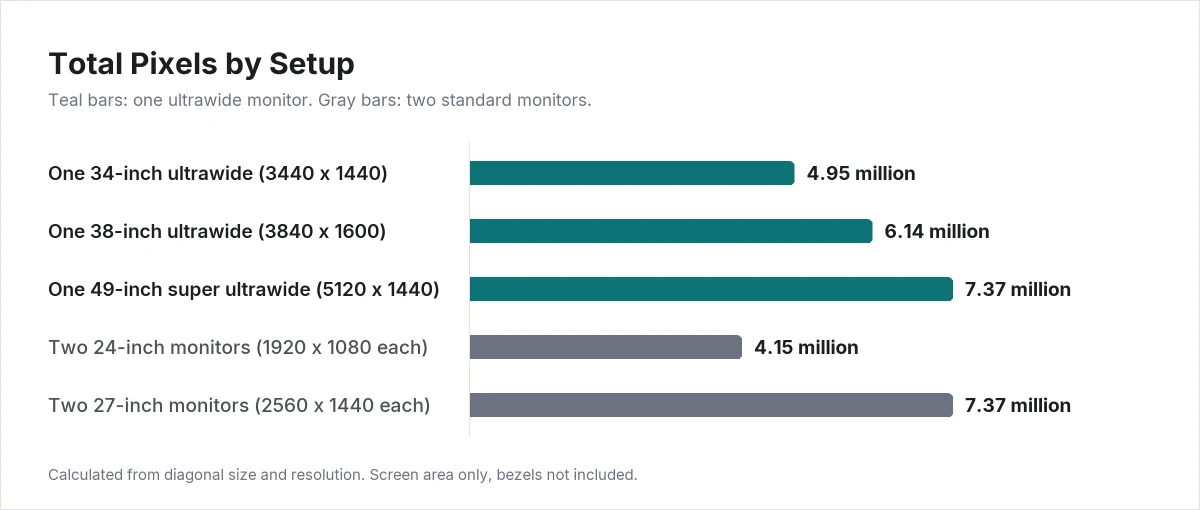
- A 34-inch ultrawide is not a replacement for two 27-inch monitors. It has about one third fewer pixels. The single screen that matches two 27-inch monitors is a 49-inch super ultrawide.
How Much Screen Do You Get?
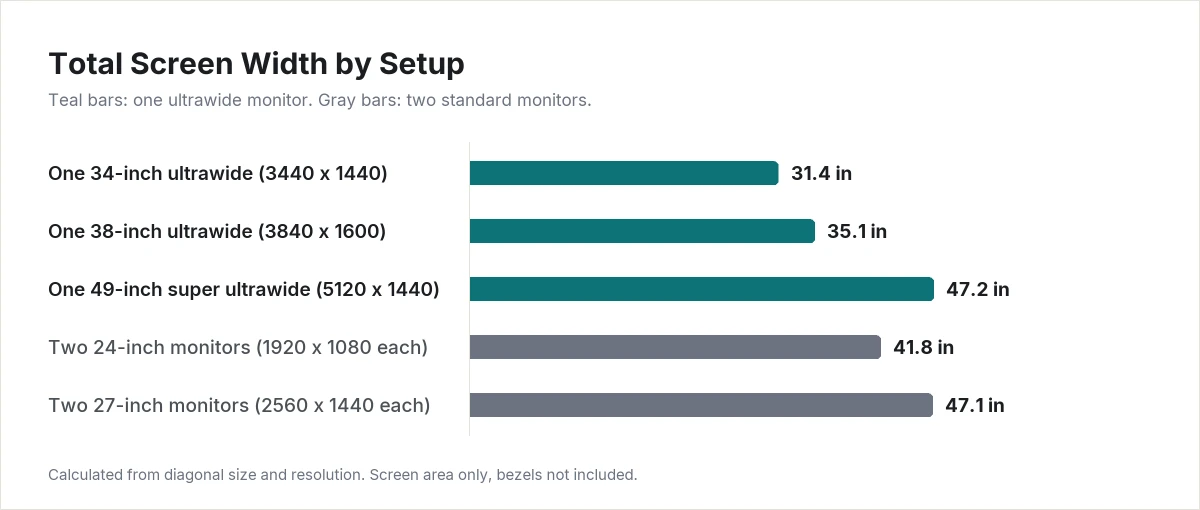
The table below compares common setups. Width and height are the screen area only, calculated from the diagonal size and resolution. Bezels and stands add more.
| Setup | Resolution | Total width | Height | Total pixels | Pixels per inch |
|---|---|---|---|---|---|
| One 34-inch ultrawide | 3440 x 1440 | 31.4 in | 13.1 in | 4.95 million | 110 |
| One 38-inch ultrawide | 3840 x 1600 | 35.1 in | 14.6 in | 6.14 million | 109 |
| One 49-inch super ultrawide | 5120 x 1440 | 47.2 in | 13.3 in | 7.37 million | 109 |
| Two 24-inch monitors | 1920 x 1080 each | 41.8 in | 11.8 in | 4.15 million | 92 |
| Two 27-inch monitors | 2560 x 1440 each | 47.1 in | 13.2 in | 7.37 million | 109 |
Three things stand out.
A 34-inch ultrawide is one and a third 27-inch monitors, not two. It has the same height and sharpness as a 27-inch 2560 x 1440 monitor, with about 34% more width. Split in half, it gives two windows that are each 1720 pixels wide. That is narrower than a single 1920 x 1080 screen.
A 49-inch super ultrawide equals two 27-inch monitors. The pixel count is identical, and the width is within a fraction of an inch. The only difference is the missing bezel in the middle.
Two 24-inch 1080p monitors are wider but less sharp. They cover more desk than a 34-inch ultrawide, with fewer pixels and a lower pixel density, so text looks coarser.
Where an Ultrawide Works Better
One continuous workspace
There is no bezel in the middle. A timeline, a wide spreadsheet, or a design canvas can stretch across the whole screen. On dual monitors, anything that spans both screens is cut by the gap between them.
One cable, one video output
An ultrawide is a single display. It needs one video connection, and it counts as one external display. That matters on laptops that support a limited number of external displays or have few video ports.
Simpler setup
One stand or one monitor arm, one power cable, and one set of picture settings. Two monitors, even the same model, can look slightly different in color and brightness and may need adjusting to match.
Flexible window sizes
You are not limited to two equal halves. Windows and macOS both include window snapping. On Windows 11, hovering over a window’s maximize button or pressing Windows key + Z opens Snap layouts, and Microsoft says the layouts offered depend on the size of the display. On a Mac, recent versions of macOS let you tile windows by dragging them to a screen edge or by using the green button in the window’s corner.
Where Dual Monitors Work Better
A natural split between tasks
Each screen is its own space. Maximize an app and it fills one monitor, leaving the other untouched. You do not need to arrange windows at all, which suits people who keep email or chat on one screen and their main work on the other.
Screen sharing and full-screen apps
When you share one monitor in a video call, viewers see a standard-shaped screen. Sharing a full ultrawide screen sends a very wide image that looks small on a normal display. Full-screen video is similar: a 16:9 video on a 3440 x 1440 ultrawide fills about 74% of the width, with black bars on the sides.
One screen can turn vertical
With two monitors, you can rotate one to portrait for long documents, code, or web pages and keep the other in landscape. An ultrawide cannot do this.
Cost and replacement
You may already own one monitor, so going dual can mean buying only one more. If one screen fails, you still have the other.
What Each Setup Needs From Your Computer and Desk
- Video outputs. Dual monitors need two video signals from the computer. Check how many external displays your laptop supports before buying. Some laptops support only one.
- Graphics load. More pixels need more graphics power. Two 27-inch 2560 x 1440 monitors have about 49% more pixels than one 34-inch ultrawide.
- Desk width. Two 27-inch monitors need about 47 inches of screen width plus bezels. A 34-inch ultrawide needs about 31 inches.
- Arms and mounts. A dual setup needs a dual arm or two stands. A large ultrawide needs an arm rated for its weight and size. Check the VESA pattern and weight rating before buying a mount.
Who Should Skip Each Setup
Skip the ultrawide if you present or share your screen for much of the day, you rely on a vertical screen, or you expect a 34-inch model to replace two 27-inch monitors. It will feel smaller.
Skip dual monitors if your laptop supports only one external display, your desk is narrower than the two screens, or your work spans one wide window and the center gap would cut through it.
What About Laptops and Travel?
Neither setup travels. If you want extra screens on the road, a portable dual monitor folds or clips onto a laptop. We compare three designs in our guide to the best portable dual monitors for laptops.
Final Thoughts
For one wide task and a clean desk, an ultrawide is the simpler choice. For separate apps, frequent screen sharing, or a vertical screen, dual monitors fit better. If you want the screen area of two 27-inch monitors without the gap, look at a 49-inch super ultrawide and make sure your desk is at least 48 inches wide.
Browse monitor reviews in our PC Monitors section.
Frequently Asked Questions
Is a 34-inch ultrawide the same as two 24-inch monitors?
No. Two 24-inch monitors are about 10 inches wider in total. A 34-inch 3440 x 1440 ultrawide has more pixels and sharper text than two 1920 x 1080 monitors, in a narrower space.
Is an ultrawide better for spreadsheets?
It shows more columns in a single window without a break. If you compare two separate workbooks, two monitors or a split ultrawide both work.
Can I use an ultrawide and a second monitor together?
Yes, if your computer supports two external displays. A common layout is an ultrawide in the center with a smaller monitor turned vertically beside it.
Do ultrawide monitors work with a Mac?
Yes. A Mac treats an ultrawide as one external display. Recent versions of macOS include window tiling for arranging windows side by side.
Do dual monitors have to match?
No, but matching models line up in height and look the same in color and brightness. Mixed sizes and resolutions work, with a visible step where the screens meet.