
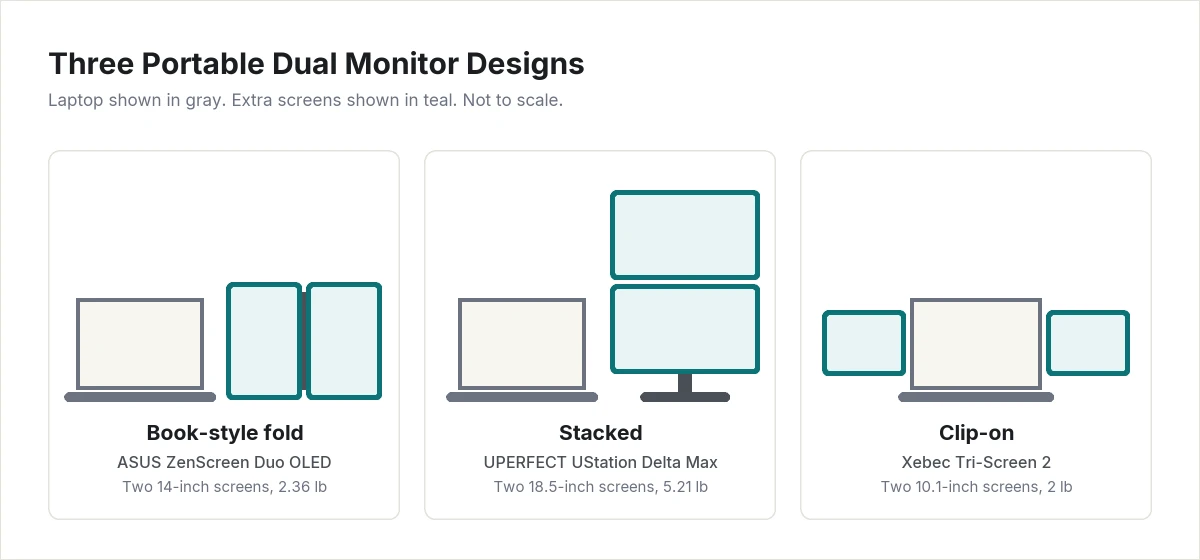
A portable dual monitor puts two extra screens in one device, so a laptop becomes a three-screen workstation that still fits in a bag. The products sold under this name are not all alike. Some fold like a book, some stack one screen above the other, and some clip onto the laptop’s lid.
This guide compares one strong example of each design. We explain what each design is good at, what your laptop needs to drive two extra screens, and who should skip each pick. If one extra screen is enough, see our guide to the best portable monitors for MacBook Pro.
Our Picks at a Glance
| Pick | Design | Screens | Weight | Viewing Score |
|---|---|---|---|---|
| ASUS ZenScreen Duo OLED (MQ149CD) | Book-style fold | Two 14-inch OLED, 1920 x 1200 | 2.36 lb | 8.1 |
| UPERFECT UStation Delta Max | Stacked | Two 18.5-inch IPS, 1920 x 1080 | 5.21 lb | 7.0 |
| Xebec Tri-Screen 2 | Clip-on | Two 10.1-inch IPS, 1920 x 1200 | 2 lb | 6.8 |
How We Picked
We did not set up these monitors ourselves. Each Viewing Score comes from research: manufacturer spec sheets and independent published reviews. Every product is scored on the same five criteria we use across the site:
- Picture quality (35%): panel type, resolution for the screen size, brightness, and color gamut.
- Value (20%): what you get for the money compared with the rest of this list.
- Features and connectivity (20%): ports, included cables and power adapter, stand or mounting options, and speakers.
- Reliability and owner feedback (15%): findings from independent reviews.
- Design and build (10%): weight, materials, and how easily it travels.
The full method is on our How We Review page.
The three designs
- Book-style fold: two screens joined by a hinge. It stands on its own beside the laptop and can sit side by side or one above the other.
- Stacked: two larger screens, one above the other, on a single stand. It gives the most screen area but weighs the most.
- Clip-on: two small screens that attach behind the laptop’s lid and slide out to the left and right. Everything moves as one unit, but the laptop’s hinge carries the extra weight.
ASUS ZenScreen Duo OLED (MQ149CD): Best Picture in the Lightest Package
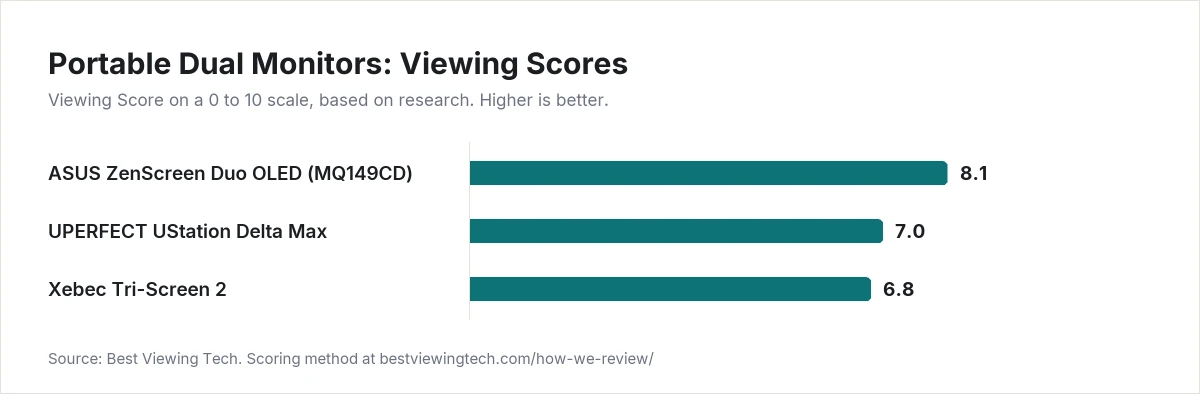
Viewing Score: 8.1
The ZenScreen Duo OLED has the best panels on this list. ASUS lists two 14-inch OLED screens at 1920 by 1200 in a 16:10 shape, with 400 nits of typical brightness, 100% DCI-P3 color coverage, and a 60Hz refresh rate. OLED pixels produce their own light, so black areas are fully dark.
The two screens fold together like a book. Folded, the monitor measures 12.56 by 8.35 by 0.59 inches and weighs 2.36 lb. There are two USB-C ports with DisplayPort and one mini HDMI port, plus a tripod socket.
ASUS includes more in the box than the other picks: a sleeve, two USB-C cables, a mini HDMI to HDMI cable, a power adapter, and a tripod socket kit.
Tom’s Hardware praised the color, build quality, and flexibility in its review, and listed the high price and the lack of speakers as the drawbacks. The reviewer connected it to a laptop with a single USB-C cable.
Pros
- Two OLED screens with 100% DCI-P3 coverage
- 2.36 lb, light for a two-screen device
- 16:10 screens show more of a document than 16:9
- Aluminum panel housings and hinges, according to Tom’s Hardware
- Sleeve, cables, power adapter, and tripod kit included
Cons
- Priced high, according to Tom’s Hardware
- No built-in speakers
- 14-inch screens are smaller than the stacked pick’s 18.5-inch screens
- 60Hz refresh rate
Who should skip it: Anyone who needs the largest possible work area for spreadsheets or timelines. The UPERFECT UStation Delta Max has much bigger screens. Buyers on a tight budget should also look elsewhere.
UPERFECT UStation Delta Max: Most Screen Area
Viewing Score: 7.0
The Delta Max stacks two 18.5-inch IPS screens on one folding stand. Each screen is 1920 by 1080 with a 100Hz refresh rate, 300 nits of brightness, and 100% sRGB coverage, according to the specifications published in The Gadgeteer’s review. It also has built-in speakers, a headphone jack, and a 75 by 75 mm VESA mount.
The Gadgeteer reported that it works with macOS without drivers and can act as two separate displays or one tall extended display. The same review noted that running it from a single USB-C cable dims the screens, and that it works best with the included AC adapter plugged in. The box includes two USB-C cables, two HDMI to mini HDMI adapters, and the AC adapter.
The cost of that screen area is size. The Delta Max weighs 5.21 lb and measures 16.73 by 10.24 inches folded. For comparison, Apple lists the 14-inch MacBook Pro at 3.4 lb.
Pros
- Two 18.5-inch screens, the largest on this list
- Stacked layout keeps both screens in front of you
- 100Hz refresh rate
- Built-in speakers and VESA mount
- Works without drivers on macOS, according to The Gadgeteer
- AC adapter and cables included
Cons
- 5.21 lb, heavy for daily carry
- 1920 by 1080 on an 18.5-inch screen works out to about 119 pixels per inch, so text is less sharp than on the other picks
- Needs its AC adapter for full brightness, according to The Gadgeteer
- Side-mounted ports make cable routing untidy, according to The Gadgeteer
- sRGB color only
Who should skip it: Frequent flyers and anyone who works from a small cafe table. It suits a desk you return to, a hotel room, or a home office you pack away at night. For carrying every day, the ASUS ZenScreen Duo OLED weighs less than half as much.
Xebec Tri-Screen 2: Best Clip-On Design
Viewing Score: 6.8
The Tri-Screen 2 is the only pick that attaches to the laptop. Xebec lists two 10.1-inch IPS screens at 1920 by 1200, a 16:10 shape, and a 60Hz refresh rate. The frame fits laptops with screens from 12 to 20 inches, and the whole unit weighs 2 lb.
In its review, Techgage described a clamping system that holds the laptop’s edges without adhesives or magnets, and screens that fold away so the lid can still close. That makes it the easiest pick to use on a lap, a tray table, or anywhere without room for a separate stand.
Xebec lists two USB-C inputs with DisplayPort and includes dongles for USB-A ports. Before buying, check that your laptop has enough video-capable ports for both screens. Each screen draws its power from the laptop, listed at 5V and 2A per screen, so expect shorter battery life.
Pros
- Attaches to the laptop, so no extra desk space is needed
- 2 lb for two screens
- Fits laptops from 12 to 20 inches
- No adhesives or magnets on the laptop lid, according to Techgage
- Sharp 1920 by 1200 resolution for the screen size
Cons
- 10.1-inch screens are small for full-size windows
- Priced high for the screen size, according to Techgage
- Powered by the laptop, which shortens battery life
- Adds weight to the laptop’s lid and hinge
- Xebec’s spec list does not state a brightness figure
Who should skip it: People who work at a desk most of the time. A book-style or stacked monitor gives far larger screens. Owners of thin laptops with soft hinges should also be cautious about hanging 2 lb on the lid.
Not Yet Scored: Mobile Pixels Trio
Mobile Pixels also makes clip-on screens, and its Trio line is an alternative to the Xebec Tri-Screen 2. We could not confirm its current specifications with the manufacturer at the time of writing, so we have not scored it. We will add it when we can.
How to Choose a Portable Dual Monitor
Check how many screens your laptop can drive
This is the most common reason a dual monitor disappoints. Two extra screens usually need two video signals. Check how many external displays your laptop supports, and how many of its ports can output video. Some laptops support only one external display. On those, one of the two screens will not work as a separate display without extra hardware.
Count your ports
A USB-C port only carries video if it supports DisplayPort Alt Mode or Thunderbolt. If your laptop has one such port, look for a monitor with HDMI as a second input, like the ASUS and UPERFECT picks, and use the laptop’s HDMI port for the second screen.
Plan for power
Two screens draw more power than one. A clip-on model that runs from the laptop will shorten battery life. The ASUS and UPERFECT picks include their own power adapters, which matters for long work sessions.
Match the design to where you work
Clip-on screens work anywhere the laptop does, including on your lap. Book-style and stacked monitors need a flat surface beside or behind the laptop. If you work mostly at a desk, pick by screen size. If you work in transit, pick by weight.
Weigh the whole kit
Add the monitor’s weight to your laptop’s. A 5.21 lb stacked monitor can double the load in your bag. The book-style and clip-on picks here add about 2 to 2.4 lb.
Final Thoughts
The ASUS ZenScreen Duo OLED (MQ149CD) is the best choice for most laptop owners: two OLED screens, wide color, and the lowest weight for its screen size. Choose the UPERFECT UStation Delta Max if screen area matters more than weight. Choose the Xebec Tri-Screen 2 if you often work without a desk and want the screens attached to the laptop.
Browse more options in our Portable Monitors section.
Frequently Asked Questions
What is a portable dual monitor?
It is a single device with two screens that connects to a laptop to add two extra displays. The main designs are book-style folding monitors, stacked monitors, and clip-on screens that attach to the laptop’s lid.
Can any laptop run two extra screens?
No. The laptop must support at least two external displays and have enough video outputs. Check the manufacturer’s specifications for your exact model before buying.
Do portable dual monitors need a power outlet?
It depends on the model. Clip-on screens like the Xebec Tri-Screen 2 run from the laptop. Larger models like the UPERFECT UStation Delta Max work best with their AC adapter connected.
Are clip-on screens safe for a laptop hinge?
They add weight to the lid, and the hinge has to carry it. The Xebec Tri-Screen 2 adds 2 lb. If your laptop’s hinge is loose or the lid is very thin, a freestanding book-style monitor is the safer choice.
Is a portable dual monitor better than one large portable monitor?
Two screens let you keep separate apps side by side. One larger screen is simpler, lighter, and needs only one video output. If you mainly want more room for a single app, one portable monitor is usually enough.