Streaming sticks are the simplest way to add apps to a TV. The device plugs straight into an HDMI port, hides behind the screen, and needs no shelf space. That makes sticks a good fit for bedroom TVs, wall-mounted TVs, older TVs, and travel.
The trade-off is fewer ports. No stick on this list has a built-in Ethernet port, and most get less memory than full-size boxes. This guide compares the current 4K sticks from Amazon and Roku, ranks them with our Viewing Score, and explains who should skip each one. If you have room for a box, see our best streaming devices guide.
Our Picks at a Glance
| Pick | Best for | Viewing Score |
|---|---|---|
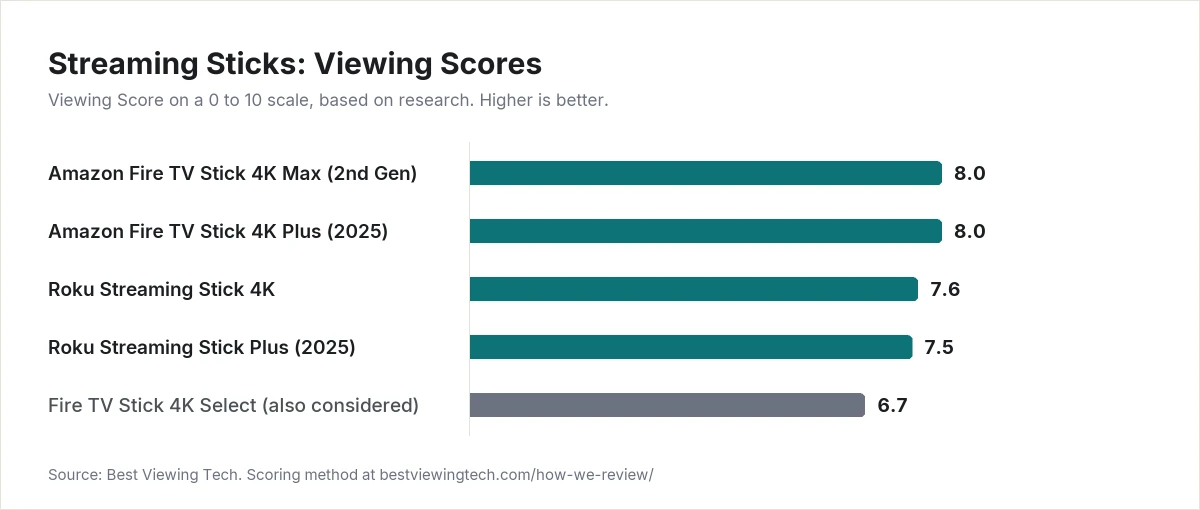
| Amazon Fire TV Stick 4K Max (2nd Gen) | Best overall stick | 8.0 |
| Amazon Fire TV Stick 4K Plus (2025) | Best value 4K stick | 8.0 |
| Roku Streaming Stick 4K | Best Roku stick, neutral platform | 7.6 |
| Roku Streaming Stick Plus (2025) | Best for travel and TVs without a free outlet | 7.5 |
We also looked at the Fire TV Stick 4K Select (2025), which scored 6.7. We explain below why it did not make the list.
How We Picked
We did not set up these sticks in our own homes. Each Viewing Score comes from research: manufacturer spec sheets, independent published reviews, and owner feedback. Every product is scored on the same five criteria we use across the site:
- Picture and sound quality (35%): 4K and HDR format support (Dolby Vision, HDR10+, HLG) and Dolby Atmos support.
- Value (20%): what you get for the current list price compared with the rest of this list.
- Features and connectivity (20%): Wi-Fi generation, memory and storage, and remote features.
- Reliability and owner feedback (15%): software support and recurring complaints from owners.
- Design and build (10%): size, power setup, and remote quality.
The full method is on our How We Review page. Scores for products that also appear in our other guides are the same across articles.
Updated October 5, 2026: Amazon and Roku raised list prices on these sticks during 2026 without changing the hardware. We rescored value using current list prices.
Amazon Fire TV Stick 4K Max (2nd Gen): Best Overall Stick
Viewing Score: 8.0
The Fire TV Stick 4K Max is the most capable stick you can buy right now. Amazon’s developer spec sheet lists a quad-core processor up to 2.0 GHz, 2GB of RAM, 16GB of storage, and tri-band Wi-Fi 6E.
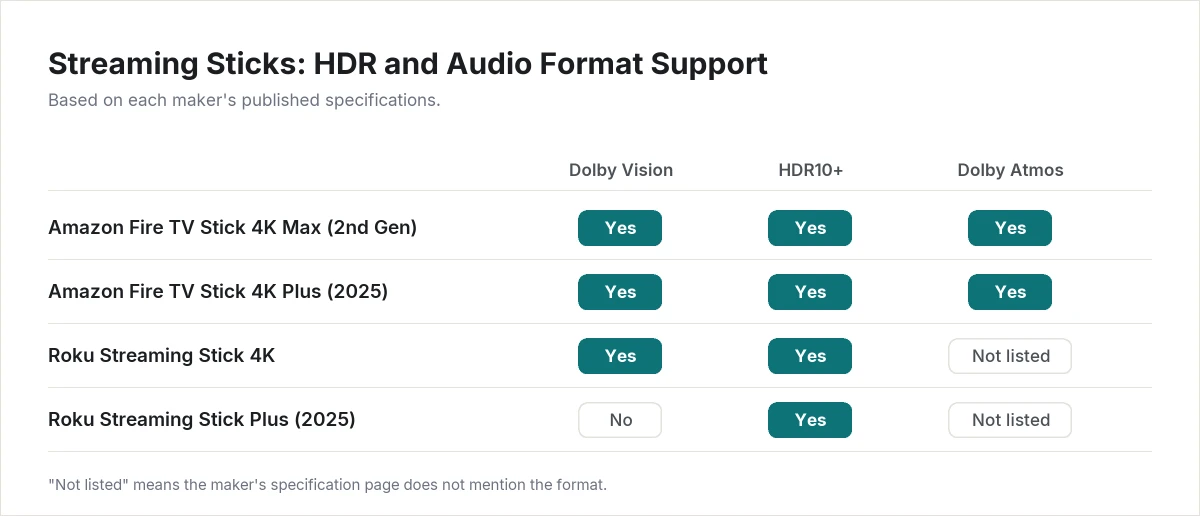
It supports Dolby Vision, HDR10, HDR10+, and HLG at 4K 60fps, plus Dolby Atmos. It runs Fire OS 8, so it has the full Fire TV app catalog and still supports sideloading apps.
Pros
- Wi-Fi 6E, the only stick here with 6 GHz support
- Twice the storage of the Fire TV Stick 4K Plus
- Dolby Vision, HDR10+, and Dolby Atmos
- Full Fire OS app catalog
Cons
- Amazon’s interface puts heavy emphasis on Amazon content and ads
- No built-in Ethernet port
- Costs more than the Fire TV Stick 4K Plus, which has the same HDR and Atmos support
- A higher list price since August 2026 for the same hardware
Who should skip it: People who want a neutral, ad-light home screen should look at Roku. If you do not have a Wi-Fi 6E router and do not need extra storage, the 4K Plus covers the same formats for less.
Amazon Fire TV Stick 4K Plus (2025): Best Value 4K Stick
Viewing Score: 8.0
The Fire TV Stick 4K Plus ties the 4K Max on score. Its lower price makes up for its smaller specs. It has a quad-core processor up to 1.7 GHz, 2GB of RAM, 8GB of storage, and dual-band Wi-Fi 6.
Format support matches the 4K Max: Dolby Vision, HDR10, HDR10+, and HLG at 4K 60fps, plus Dolby Atmos. It also runs Fire OS 8, so the app catalog and sideloading support are the same.
Pros
- Same HDR and Dolby Atmos support as the 4K Max
- Wi-Fi 6
- Full Fire OS app catalog
- Lower price than the 4K Max
Cons
- 8GB of storage fills up faster if you install many apps
- A slower processor than the 4K Max
- The same ad-heavy Amazon home screen
- No built-in Ethernet port
- A higher list price since August 2026 for the same hardware
Who should skip it: Heavy app users who want more storage should pick the 4K Max. Anyone who dislikes Amazon’s interface should look at Roku.
Roku Streaming Stick 4K: Best Roku Stick
Viewing Score: 7.6
The Roku Streaming Stick 4K is the stick to buy if you prefer Roku’s simple interface. It does not push Amazon services, and it works equally well with any phone. Roku lists 4K at 60fps with Dolby Vision, HDR10, HDR10+, and HLG.
Wi-Fi is dual-band 802.11ac (Wi-Fi 5), handled by a long-range receiver built into the power cable. The included voice remote has TV power, volume, and mute buttons and runs on AAA batteries.
Pros
- Dolby Vision and HDR10+ support
- Neutral platform with a simple, consistent interface
- Long-range Wi-Fi receiver in the power cable
Cons
- Roku’s spec page does not list Dolby Atmos support
- Wi-Fi 5 only
- Basic remote without backlight or rechargeable battery
- A higher list price since July 2026, now above the Fire TV Stick 4K Plus
Who should skip it: Anyone with a Dolby Atmos soundbar, since Roku does not list Atmos for this stick. The Fire TV Stick 4K Plus or 4K Max is a better fit.
Roku Streaming Stick Plus (2025): Best for Travel
Viewing Score: 7.5
The Roku Streaming Stick Plus is the smallest 4K option here. Roku lists it at 3.7 by 0.80 by 0.45 inches and 0.90 ounces. It draws power over USB-C, and Roku says the TV’s own USB port can power it. That means you do not need a free wall outlet, which is useful for hotel rooms and wall-mounted TVs.
It streams 4K at 60fps with HDR10, HDR10+, and HLG. It does not support Dolby Vision, and Roku does not list Dolby Atmos. The included voice remote has TV power, volume, and mute buttons and runs on AAA batteries.
Pros
- Can run on power from the TV’s USB port
- Very small and light, easy to pack
- HDR10+ support
- Same Roku interface as the other Roku players
Cons
- No Dolby Vision
- No listed Dolby Atmos support
- Basic remote without backlight or rechargeable battery
- A higher list price since July 2026 for the same hardware
Who should skip it: Owners of Dolby Vision TVs and Dolby Atmos sound systems. The Roku Streaming Stick 4K adds Dolby Vision, and the Fire TV sticks add both.
Also Considered: Fire TV Stick 4K Select (2025)
Viewing Score: 6.7
The Fire TV Stick 4K Select is Amazon’s lowest-cost 4K stick, but we do not recommend it for most people. It runs Vega OS, Amazon’s new Linux-based system, instead of the Android-based Fire OS.
Independent reporting from AFTVnews confirms that Vega OS does not support sideloading, and the app library is smaller than on Fire OS. On paper, the hardware is also a step down. It has 1GB of RAM, half as much as the 4K Plus, and Wi-Fi 5 instead of Wi-Fi 6. It supports HDR10, HDR10+, and HLG, but not Dolby Vision.
If you only watch the major streaming services and want the lowest price from Amazon, it can work. For everyone else, the 4K Plus is the safer choice.
How to Choose a Streaming Stick
Check the HDR formats your TV supports
Some TVs support Dolby Vision, some support HDR10+, and some support both. The Fire TV Stick 4K Max, 4K Plus, and Roku Streaming Stick 4K cover both. The Roku Streaming Stick Plus and Fire TV Stick 4K Select do not support Dolby Vision.
Think about your sound system
If you use a Dolby Atmos soundbar or receiver, choose a stick that lists Atmos support. On this list, that means the Fire TV Stick 4K Max or 4K Plus.
Look at power and placement
Most sticks need a wall outlet. The Roku Streaming Stick Plus can run from the TV’s USB port, which keeps cables tidy on wall-mounted TVs. If your TV’s HDMI ports are crowded, a short HDMI extender can help any stick fit.
Know when a box is better
Sticks have no Ethernet port. If your Wi-Fi is weak where the TV sits, or you want the fastest interface, a box like the Roku Ultra or Apple TV 4K is a better choice. We compare those in our best streaming devices guide.
What about Google?
Google no longer sells a streaming stick. Its current player, Google TV Streamer, is a small box. We cover it in our best streaming devices guide.
Final Thoughts
For most people, the Fire TV Stick 4K Plus (2025) is the best value: full HDR and Dolby Atmos support, Wi-Fi 6, and the full Fire OS app catalog. Choose the 4K Max if you have a Wi-Fi 6E router or install many apps. If you prefer a neutral interface, the Roku Streaming Stick 4K is the better pick.
Browse more players in our Streaming & Media Players section.
Frequently Asked Questions
Is a streaming stick as good as a streaming box?
For picture quality, often yes, because the best sticks support the same HDR formats as boxes. Boxes usually add an Ethernet port, more memory, and better remotes. Those help most on large TVs and in homes with weak Wi-Fi.
Can I plug a streaming stick into any TV?
You need a free HDMI port. For 4K HDR, your TV must also support 4K and HDR on that port. Older HD TVs will still work, but the picture will be limited to what the TV can show.
Can I use a streaming stick in a hotel?
Often, yes, if the TV’s HDMI port is accessible. Some hotel networks require you to sign in through a web page, and that can be hard to complete on a stick. A compact stick that runs on TV USB power, like the Roku Streaming Stick Plus, is the easiest to travel with.
Why doesn’t the Fire TV Stick 4K Select support sideloading?
It runs Vega OS, Amazon’s new Linux-based system, instead of the Android-based Fire OS. Android apps cannot be installed on it outside Amazon’s app store.